Client
etütle
Web and Mobile Application
etütle
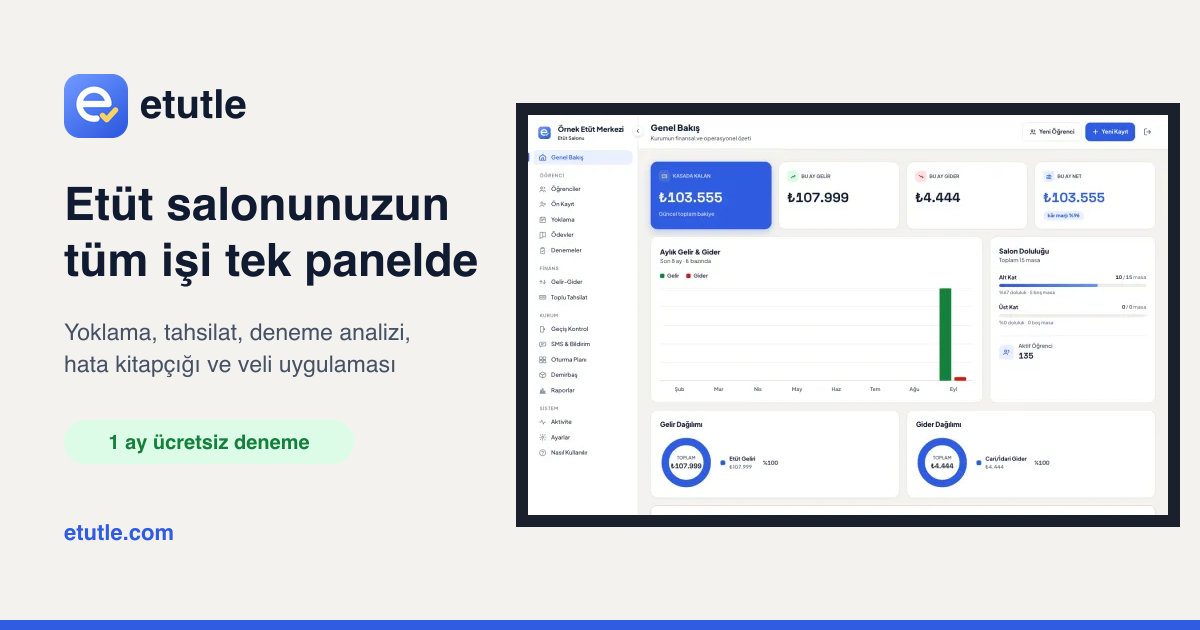
The Hitit Medya team built etütle from the first line of code to the app stores: a web panel and iOS/Android app that bring attendance, fees, exam analytics and parent communication into one place for study centres, tutoring schools, K-12 schools and coaches.
Attendance, fees, exam results and parent communication were scattered across notebooks, spreadsheets and phone calls, so no one could see a student’s attendance, payments and progress in one place.
The Hitit Medya team unified 31 modules in a single data model on a multi-tenant Next.js and PostgreSQL panel, brought parents, students, teachers and drivers together in one Expo app, and automated data entry with optical reading, OCR and turnstile bridges.
In under six weeks from the first line of code, etütle became an education technology product serving four institution types, live on the App Store and Google Play, delivering everything from attendance to report cards in one web and mobile experience.
This is the story of a product the Hitit Medya team built end to end, from the first line of code to its release on the App Store and Google Play. etütle is an education management platform for study centres, tutoring schools, K-12 schools and independent coaches. It brings everything an institution does into a single panel, from attendance and fee collection to exam analytics and parent communication. The same team, working side by side, built the web panel, the iOS and Android app, the bridges that connect to turnstiles on site, the etutle.com website and the product’s social media content.
It Started with an Attendance Notebook
What we saw in the field looked the same at every study centre: an attendance notebook at the door, a payment sheet on the desk, practice-exam results scattered across spreadsheets, and parents calling all day to ask whether their child had arrived. Attendance, payments and exam progress for the same student lived in three different places, and turning them into a meaningful report for parents took hours.
As a team we asked ourselves one question: could every action the institution takes reach parents and students at the same moment? etütle was born as the answer.
How the Hitit Medya Team Worked
- We learned from the field. We didn’t imagine screens at a desk; we mapped a study centre’s day session by session and tested every feature against real institutional data. When we tested our optical mark reader on real student answer sheets, it matched the optical scanning machine’s output on 1,456 out of 1,456 answers.
- We moved in small, testable steps. We split the work into phases that could run and be verified on their own, and never moved on before a phase was done.
- We put design into rules. We wrote down a design language for badges, colours, borders and shared components, and enforced it with an automated UI check on every commit. Hundreds of screens later, the product still looks like it came from a single hand.
- Software, design and communication in one team. The team that wrote the panel also produced the product website, the owl mascot Bilge, the Instagram carousels and the Reels videos, so the product and its story speak the same language.
Project Log: From First Line to the App Stores
The first line of etütle was written on 14 September 2026. In under six weeks and more than 500 commits across two repositories, it became a product live on the App Store and Google Play. The milestones along the way:
- 14 September · Laying the foundation. We started with enrolment, payment plans and the cash ledger. On the same day we built the drag-and-drop seating plan editor and an activity log that records every data-changing action. The data model was multi-tenant from day one, so every institution runs on the same infrastructure with fully isolated data.
- 17 September · The parent app is born. The panel had no JSON API, so we built a mobile API layer from scratch. Invite-code sign-up, attendance, payment, notes and receipt endpoints, the Expo app scaffold and push notifications all landed on the main branch that day.
- 20 September · Ready for production. We moved the panel to production with Docker, keeping the application and database on a private network with no exposed ports.
- 22 September · Meeting the hardware. We wrote two bridges for fingerprint, card and face recognition devices: a Node.js version that connects to ZKTeco devices over the network, and a C# (.NET) version for the meliTime/ZD29XX family that uses the manufacturer’s own library. The bridge only makes outbound connections, so no ports need to be opened on site; if the internet drops, entries are queued on disk and sent once the connection returns.
- 27 September · Exam analytics. We started reading exam results with the optical reader and added topic analysis and the knowledge map. We wrote the optical reader as a TypeScript port of the reader we originally built for Pangea Coaching. Staff profiles with PIN sign-in arrived the same day, and the mobile app got a full redesign.
- 29 September · The error booklet. We completed the flow that reads scanned exam booklets with Tesseract OCR, splits them into individual questions and builds a personalised error-booklet PDF for each student.
- 2 October · Tutoring schools and K-12. We opened a product that started with study centres to four institution types. Timetables, class attendance, exam organisation, grades and report cards, discipline, counselling, duty rosters, transport and meals were added to the panel and the app through a single module registry.
- 8 October · Telling the story. We began producing Instagram carousels and Reels videos from real product screens.
- 15 October · Speaking the language of schools. We added an automatic, conflict-free timetable builder driven by teaching loads and blocked hours, plus Excel import for e-Okul and K12NET class lists.
- 22 October · Today. Push notifications for students, early attendance alerts and a new section-by-section product website. etütle is live on the App Store and Google Play.
Languages and Technologies
We wrote both the web panel and the mobile app entirely in TypeScript, so the API contract on the server and the types in the mobile app share one language and match one to one.
- Web panel: Next.js 16 (App Router), React 19, Tailwind CSS v4, Prisma and PostgreSQL. React PDF and pdf-lib for documents, ExcelJS for spreadsheet import and export, Sharp for image processing, and signed JWTs with jose for sessions.
- Mobile app: Expo SDK 57, React Native 0.86 and Expo Router, with TanStack Query for data, SecureStore for credentials, Expo Notifications for push and Reanimated for smooth transitions.
- Exam analytics: OCR with Tesseract.js, plus our own template-free optical mark reader and booklet-splitting algorithms.
- Device bridges: Node.js (JavaScript) and C# / .NET Framework.
- Infrastructure: Docker with multi-stage images, separate migration and scheduled-job containers, and an Nginx reverse proxy.
Web Panel: Every Task in One Place
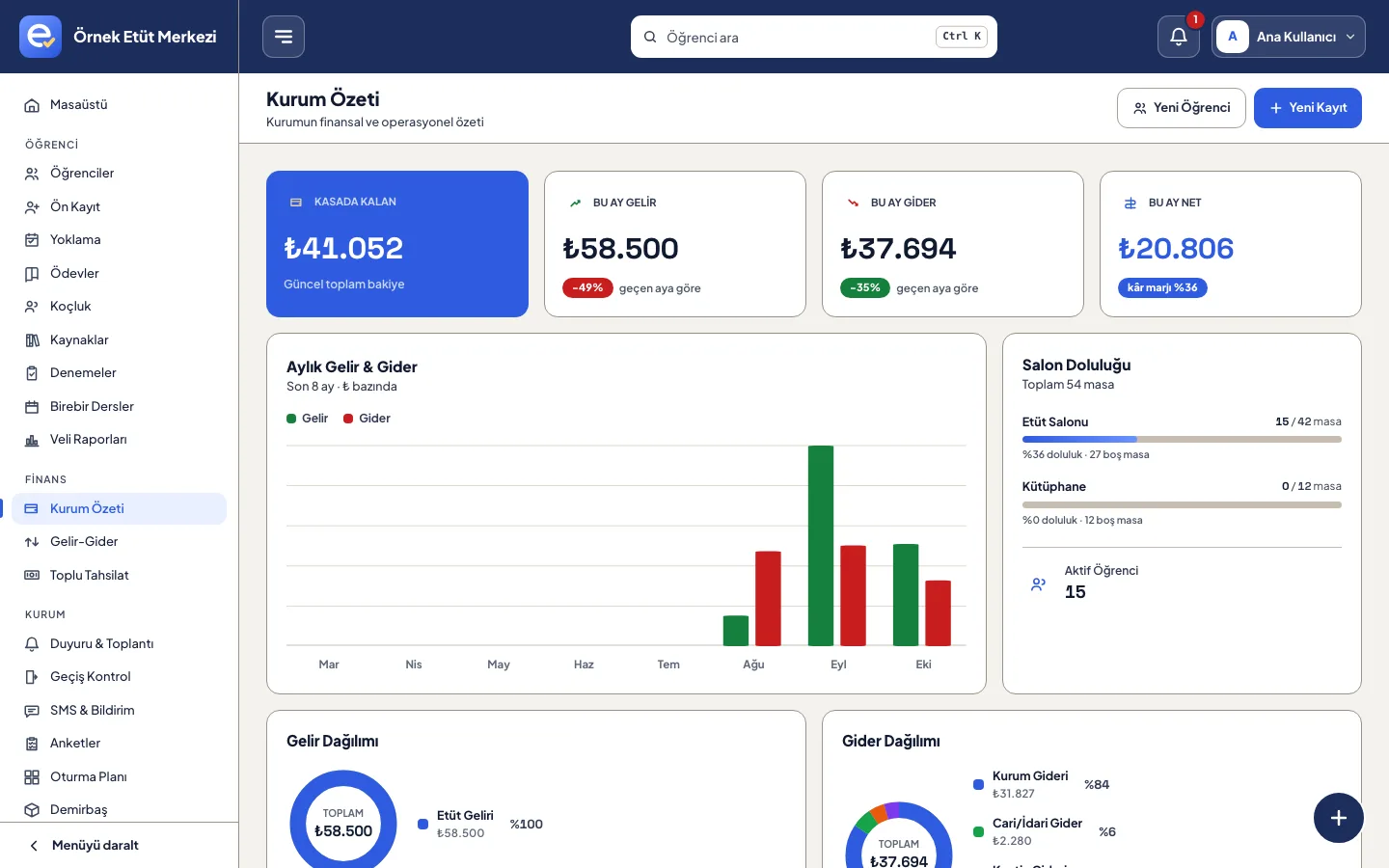
The panel offers 31 modules grouped under students, lessons and exams, parents and communication, enrolment and finance, and operations. Institutions can switch off any module they don’t use: study centres run on 21 modules, tutoring schools on 29, K-12 schools on 30 and independent coaches on 14. With staff profiles and granular permissions, every team member sees only the screens relevant to their work.
Exam Analytics, Knowledge Map and Error Booklet
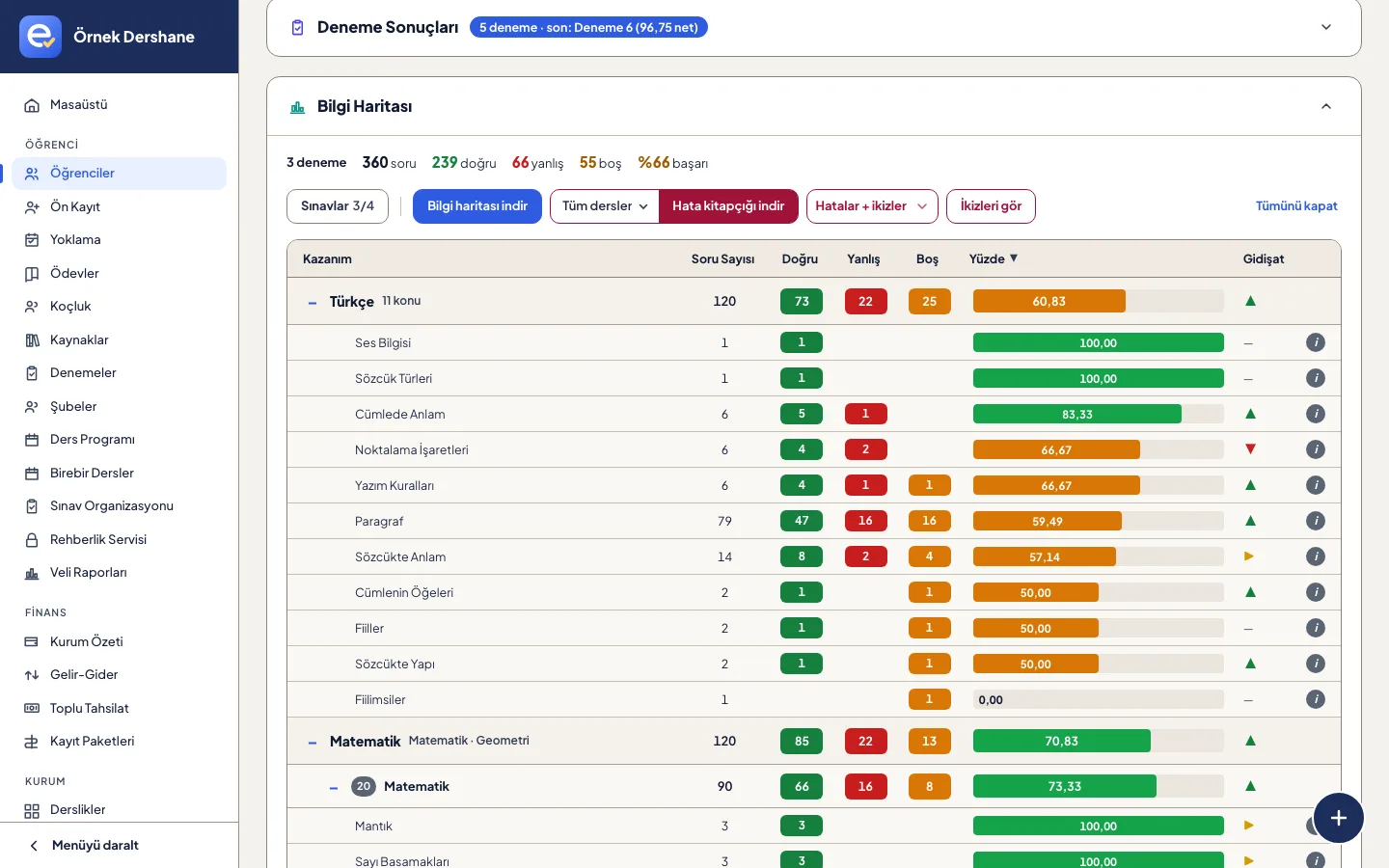
This is where our team invested the most. Results are read from PDFs, publisher files or a phone photo of the optical answer sheet. Once an exam is uploaded, the panel shows the correct-answer rate and distractors for every question. The knowledge map breaks a student’s performance down by topic and learning outcome, with weak topics in red and strong ones in green. With one click, a personalised error-booklet PDF is generated containing only the questions the student got wrong or left blank.
Mobile App: Parents, Students, Teachers and Drivers
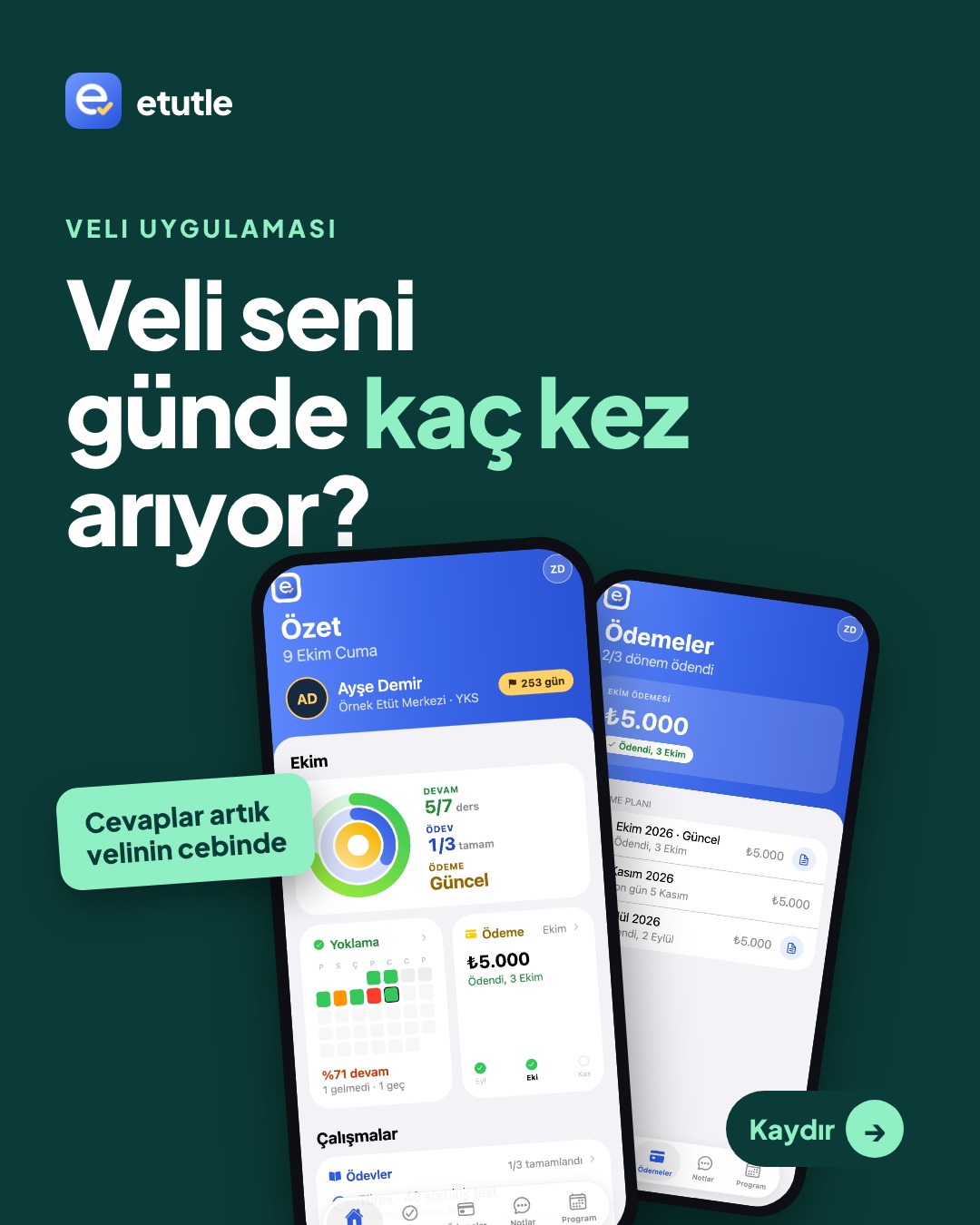
We designed four different user experiences inside a single mobile app. The app adapts to whoever signs in and only shows tabs for the modules the institution has enabled.
- Parents: A colour-coded monthly attendance calendar, payment plan and receipts, exam charts, homework, grades and report cards, teacher notes, announcements, school bus and meal menus. Siblings can be followed from the same account.
- Students: Today’s overview, weekly plan, homework, exams, resources, one-to-one lessons and surveys.
- Teachers and staff: Class attendance from the phone, with an instant notification to the parent of any absent student.
- Drivers: Bus attendance, with parents notified when a student doesn’t board.
Key Features
- Session-based attendance: Each study session has its own column, filled in automatically when a turnstile is connected.
- Fees and cash ledger: Enrolment packages, scholarships and discounts, instalment plans; paid instalments post to the ledger automatically.
- Exam analytics: Results from PDFs, publisher files or optical-sheet photos, with question and distractor analysis.
- Knowledge map and error booklet: Outcome-level performance and a personalised PDF for every student.
- Weekly plan and coaching: Students tick off their tasks and the institution sees who is falling behind.
- Timetable builder: Automatic, conflict-free weekly timetables from teaching loads and blocked hours.
- Grades and report cards: Weighted averages, rankings, honours and report-card PDFs.
- Seating plan: Floors and desks drawn with drag and drop, with occupied and free desks on one screen.
- Access control: Automatic attendance from fingerprint, card, face recognition and QR devices.
- SMS and push notifications: Recipients, templates and sending on a single screen.
- Reports: Monthly income, expenses and profit, six-month comparisons, PDF and Excel export.
- School modules: Exam organisation, discipline and behaviour, counselling, duty rosters, transport and meals.
Security and Data Protection
Parent accounts can only be created with a one-time invite code issued by the institution and tied to the parent’s phone number, and database-backed rate limiting protects against brute-force attempts. Session tokens are stored in the device’s encrypted storage, and every request re-checks the parent’s link to the student and the institution’s subscription status. Sensitive content such as counselling records is visible only to authorised staff, and data is backed up nightly with encryption, in line with KVKK, Turkey’s data protection law.
Product Website and Communication
We told the product story, the module sets for each institution type and the free-trial flow on the etutle.com website. It runs inside the same Next.js project as the panel, combining full-screen section-by-section storytelling, real panel screenshots and a demo request form in one flow. On social media, we keep introducing etütle to schools with carousels and Reels videos built from the same screens.
The Hitit Medya Signature
Every layer of etütle, from the idea and data model to hardware integration, store release, interface design and social media content, was crafted by the Hitit Medya team. If you are imagining a similar digital product in your own field, the same team is ready to build it with the same care.
Download the App
The etütle mobile app is available on the App Store and Google Play: